Good Morning!
I am at training all day. You all need to be sure hat all of your assignments from this quarter are saved in the appropriate locations.
Any work you have done should be saved in YOUR folder in the W drive.
STUDENTWORK
WADE
Period 2
"your name"
Q2
Any projects should be saved in the DROP FOLDER within the corresponding folder.
STUDENTWORK
WADE
Period 2
Drop Folder
Q2
"project title"
If that is all set, use your time appropriately and I will see you Monday.
Enjoy your weekend! Study for the exam!
Friday, January 22, 2010

Tuesday, January 5, 2010
Discussion: Gustav Klimt
For an in class discussion about Gustav Klimt, please refer to the images below. Click pictures to enlarge.
1
2
3
1

2

3

Homework: Gustav Klimt Facts
Our inspiration for our next project is Gustav Klimt.
Please find 20 facts about the artist, his work and life.
Thursday, December 17, 2009

Monday, December 14, 2009
Homework: Warhol Facts
The next project was inspired by the artwork of Andy Warhol. Please find facts about him, his life and his art to better understand the project.
20 facts = A
15 facts = B
10 facts = C
Due - December 15th
20 facts = A
15 facts = B
10 facts = C
Due - December 15th
Homework: Color Theory
Define the following color sets and list examples for each.
Primary Colors
Secondary Colors
Warm Colors
Cool Colors
Analogous Colors
Complementary Colors
Due - December 15th
Primary Colors
Secondary Colors
Warm Colors
Cool Colors
Analogous Colors
Complementary Colors
Due - December 15th
Wednesday, December 2, 2009


Monday, November 30, 2009
Exercise: Shadow & Light Portrait
Harvest a headshot from the internet that has distinct shadows on the face. Then, using the pen tool in Illustrator, trace the shadow and light side of the face as shown during the demonstration. Below is my example.


Tuesday, November 17, 2009
Out Again!?!
Sorry that I am out again but I have another doctor's appointment. Fun! Fun! Fun!
I printed up instructions on saving your work. Make sure that you set up your folder as I describe on the paper. Also be sure to save all your work in the correct location.
You should also continue working on your "van Gogh Landscape."
See you tomorrow!
I printed up instructions on saving your work. Make sure that you set up your folder as I describe on the paper. Also be sure to save all your work in the correct location.
You should also continue working on your "van Gogh Landscape."
See you tomorrow!
Monday, November 16, 2009
Project: Landscape: Before & After
Here is the photograph of a landscape that I harvested from the internet

Here is my painted rendition.


Here is my painted rendition.

Friday, November 6, 2009
Discussion: Vincent van Gogh
We will be discussing the paintings seen below. Click on the image to enlarge it.

 http://www.impressionist-art-gallery.com

Thursday, November 5, 2009
Homework: Vincent van Gogh
On a piece of paper, find 20 facts about Vincent van Gogh.
Due start of class, Friday, November 5th, 2009.
Due start of class, Friday, November 5th, 2009.
Monday, October 26, 2009
No Wade For You!!!
I will not be in today. Please work on finishing your Principles of Design Illustrations. See you Wednesday!
Wednesday, October 21, 2009
Project: Elements & Principles of Design
For the next assignment you are to illustrate six principles of design. You need to use a single shape as a constant for all images AND you are limited to only black and white (no color or gray). Do not use any distortion tools.
The principles are:
Below you will find examples of illustrations to represent the Principles of Design.
Balance:
Balance creates visual equality. You can have symmetrical balance, like the wings of a butterfly.
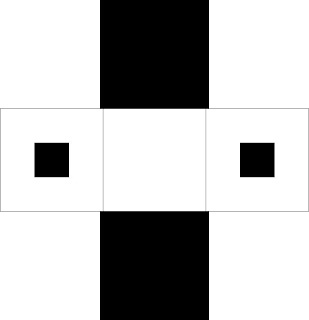 OR you can asymmetrical balance
 The image below is the same shapes as above but not balanced. Can you see the difference?

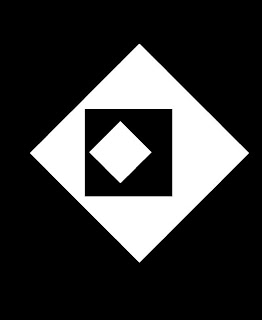
Contrast:
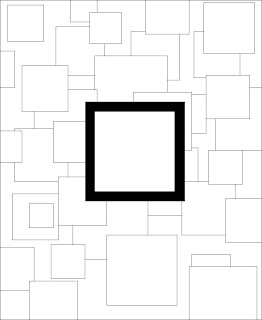
 Emphasis:
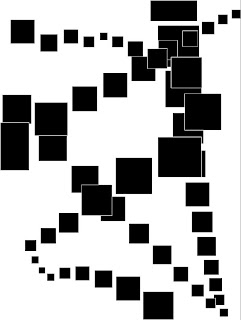
 Movement:
 Pattern:
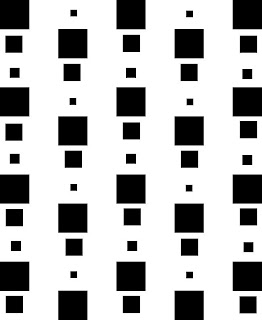 Scale:
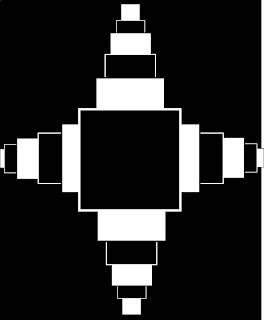
The principles are:
Balance
Contrast
Emphasis
Movement
Pattern
Scale
Contrast
Emphasis
Movement
Pattern
Scale
Below you will find examples of illustrations to represent the Principles of Design.
Balance:
Balance creates visual equality. You can have symmetrical balance, like the wings of a butterfly.
 OR you can asymmetrical balance
 The image below is the same shapes as above but not balanced. Can you see the difference?

Contrast:
 Emphasis:
 Movement:
 Pattern:
 Scale:

Tuesday, October 20, 2009
Homework: Elements and Principles of Design
It is important that you know and understand not only the principles but elements of design. I would like you to search for and define 7 elements and 7 principles of design. Write them out and cite your source(s).
Tuesday, October 6, 2009
Exercise: Clothing Replacement
First you need to harvest an image. Be sure it is a photograph depicting the entire body of the person.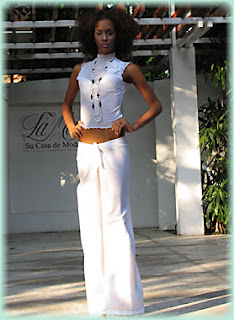 Using the pen tool, trace the shape of the clothes in the photo.
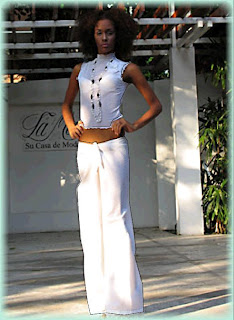 Next create a patern filled rectangle for each shape you created.

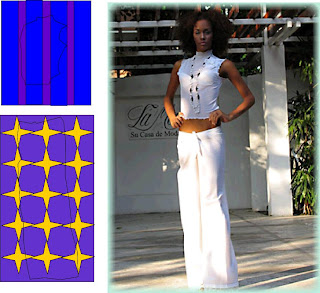 Drag the shapes oon to the pattern. Be sure that your shape is the top most object. Use ctrl+shift+up arrow to move it to the top.
Next, crop out the shapes by first selecting both the pattern filled rectangle and the clothing shape. Then "Modify - Combine - Crop." Repeat process for each piece of clothing.
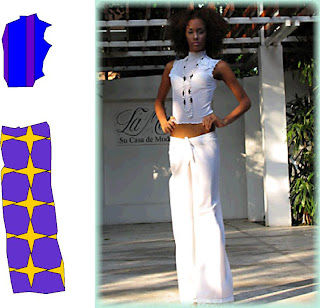
Move clothing over on top of photo. Save as "Clothes"
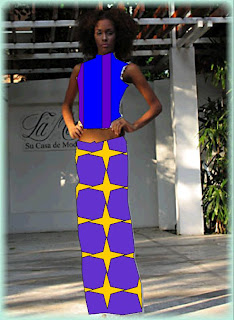
Tuesday, September 22, 2009
Project: Matisse - Sketch
Good Morning!
Before we start working on the computer I would like you to sketch out an idea for the project. I expect you to complete the sketch worksheet which explains your challenge and asks for some additional thoughts.
Your challenge: Like Henri Matisse, create an image which tells story, using cool colored rectangles for the background and warm colored organic shapes in the foreground. Your title should help tell your story.
Below is an example I created.

See you tomorrow!
Sorry I am Out... Again

This time I am out because our boiler is not working correctly and I need to be home for the service visit.
P.S. - The picture is not my boiler.
Monday, September 21, 2009
Discussion: Matisse
Looking at the images below, please complete the "Artist Discussion Worksheet." At the end of class, turn in finished worksheet.
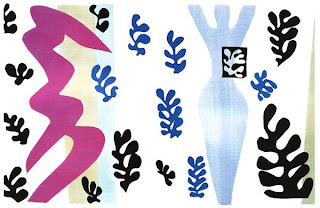
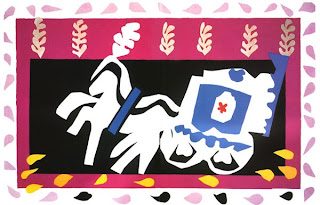
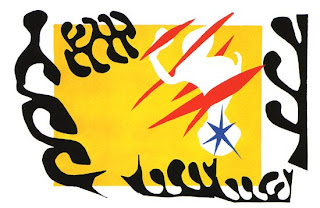


Images found at All-Art.org
Subscribe to:
Posts (Atom)